Try our service free
→ Discover complimentary downloads without needing a payment method.
Browse free





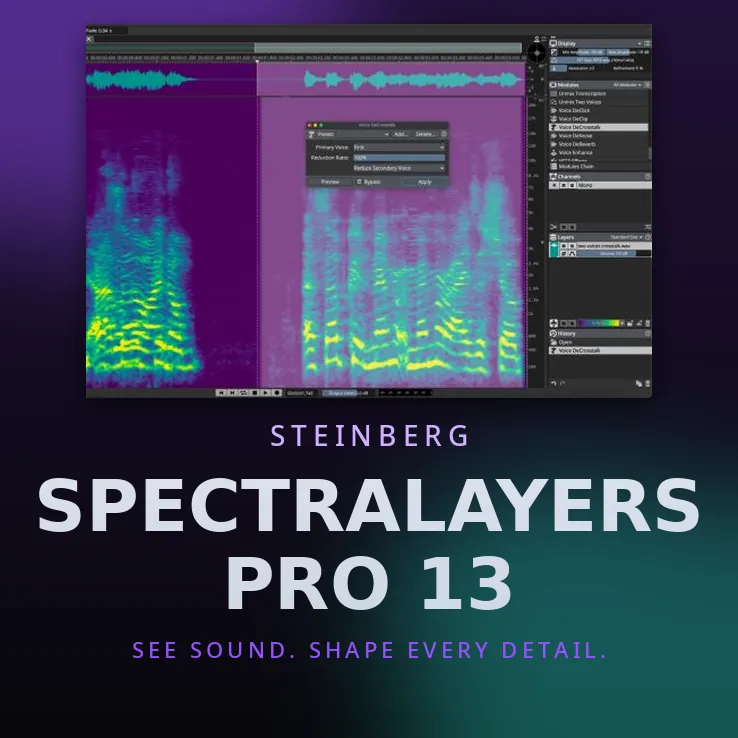


Steinberg SpectraLayers Pro 13 — See Sound. Shape Every Detail.
SpectraLayers Pro 13 is Steinberg’s spectral audio editor — the tool that lets you see your audio as a spectrogram and edit tones, transients and noise as visual objects, instead of guessing at a waveform. Released July 2026, version 13 adds powerful new AI unmixing and voice-repair tools for post-production, dialogue cleanup, audio restoration and sound design.
What’s New in Version 13
- Unmix Sound Effects — separates short sounds (door slams, footsteps, coughs) from continuous ambience (wind, crowd, traffic, nature) onto their own layer, keeping the background texture intact.
- Ambience Heal — automatically fills spectral gaps left by an unmix or cut using room tone already in the recording.
- Unmix Two Voices — separates two speakers without registering voice profiles first.
- Voice DeCrosstalk — isolates an overlapping background or foreground voice from the primary voice.
- Voice DeClick — removes mouth noise like lip smacks and tongue clicks.
- Reconstruct — resynthesizes selected spectral data: rebuild tones, transients and noise from your selections.
- Level Check — auto-updating True Peak and LU loudness measurements on selections and layer combinations.
- Attenuate and Fade modules, improved DeNoise with new precision and smoothness controls, improved Unmix Components, and Paste Into Selection / Paste Insert tools.
- Batch processing across multiple open projects, saveable UI layouts, 100+ functions assignable to keyboard shortcuts, and audio-device support beyond 128 channels.
Standalone + ARA 2
Use SpectraLayers Pro 13 as a standalone application, as an ARA 2 extension inside Cubase, Nuendo and other ARA 2 hosts, or via the Pro Tools AudioSuite Bridge for round-trip editing — now with multi-clip round-trip, Dolby Atmos up to 9.1.6 and Ambisonics. It hosts VST3 plug-ins and offers up to 384 kHz sample rate, 16 channels and unlimited layers.
Licensing — No Dongle
Steinberg Licensing: activate with your Steinberg ID through the Activation Manager on up to 3 computers. No USB dongle required. Perpetual license.
System Requirements
- Mac: macOS 12 Monterey – 26 Tahoe; Intel Core i5 (mid-2013+) or Apple Silicon.
- Windows: 64-bit Windows 10/11 (21H2+); Intel Core i5 4th-gen+, AMD Ryzen, or Qualcomm Snapdragon X; Windows 11 on Arm 24H2+ supported.
- RAM: 8 GB (16 GB recommended); 8 GB free disk; 1920×1080 display minimum; DirectX 11 GPU (DirectX 12 recommended for AI processing).
Every customer receives their own individual license key.


Reviews
Clear filtersThere are no reviews yet.