Try our service free
→ Discover complimentary downloads without needing a payment method.
Browse free




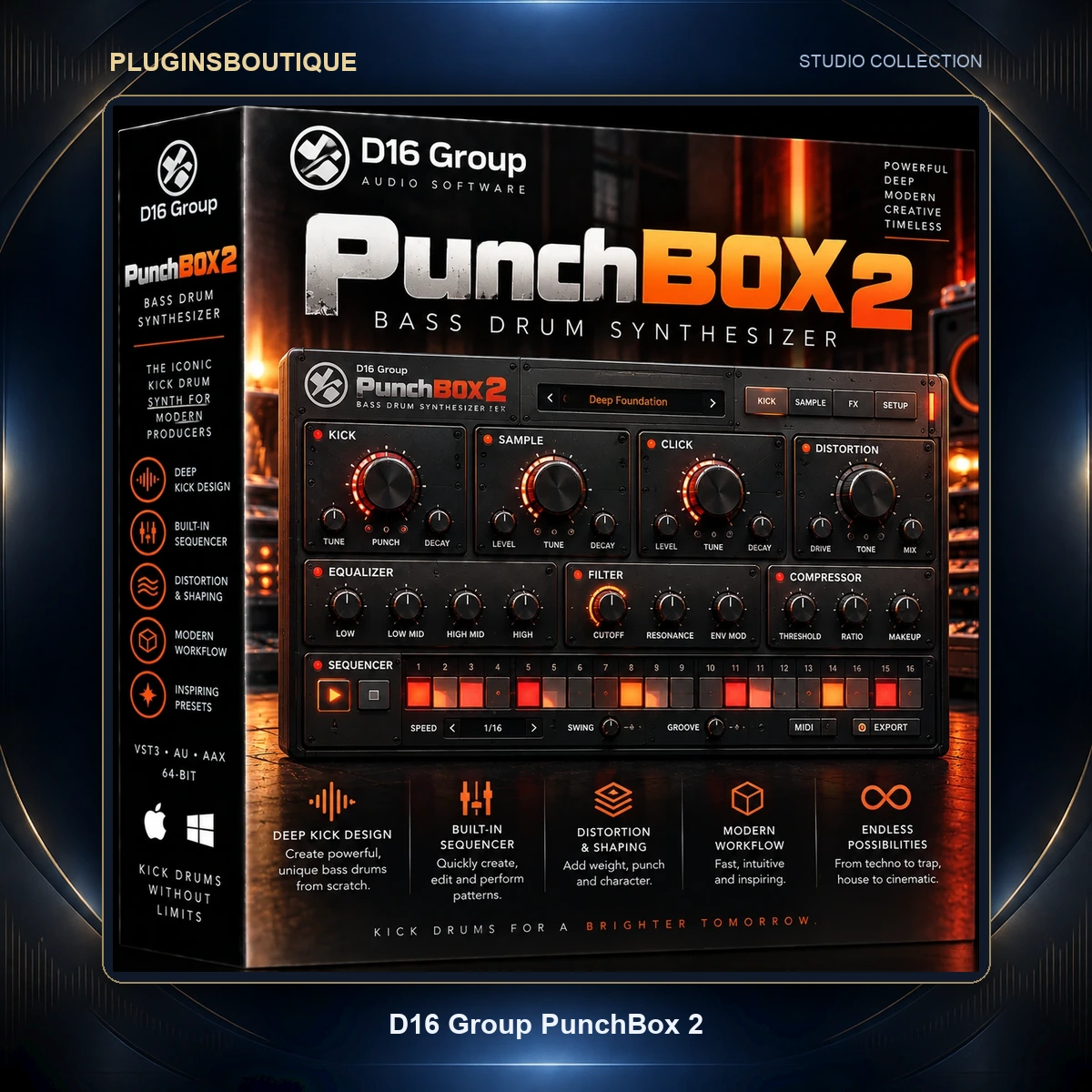


D16 PunchBox 2
Build the Kick Instead of Searching for It
Finding the right kick can consume an enormous amount of production time.
D16 Group PunchBox 2 takes a different approach.
Instead of browsing thousands of static kick samples hoping to find one that matches your track, PunchBox 2 gives you a complete hybrid environment for building the kick around your production.
Sampling, classic drum-machine synthesis and modern wavetable generation are brought together inside one instrument.
The result can range from tight electronic pulses and classic analog drum-machine sounds to huge festival kicks, deep 808-style bass drums and aggressively distorted techno kicks.
A Hybrid Kick Design Engine
PunchBox 2 is built around a hybrid kick-design architecture.
The main Kick Generator can switch between several different sound-generation approaches.
This includes sample playback and multiple synthesized kick engines.
You can therefore begin with a classic synthesized drum, a factory sample, your own sample or a modern wavetable source.
This provides significantly more flexibility than a conventional sample-based kick plugin.
Classic 909-Style Kick Synthesis
One of the Kick Generator modes is based around the architecture of the legendary 909 bass drum.
This type of kick became fundamental to:
- Techno
- House
- Acid
- Trance
- EDM
- Industrial electronic music
PunchBox 2 lets you start with this familiar synthesized character and then reshape it using additional layers, modulation and effects.
808-Style Kick Engine
For deeper low-frequency material, PunchBox 2 also includes an engine inspired by the classic 808 kick.
This is useful for:
- Hip-hop
- Trap
- Electro
- Bass music
- Deep house
- Electronic pop
- 808-style bass lines
Because the sound is synthesized, you can tune and shape the fundamental character rather than being locked into one recorded sample.
606-Style Kick Engine
A 606-inspired synthesis model provides another vintage electronic drum character.
It offers a useful alternative when a production needs a smaller or different kick personality than the familiar 808 and 909 styles.
Sine-Based Kick Synthesis
PunchBox 2 also provides a dedicated sine-based percussion synthesizer.
Sine waves are ideal starting points for electronic kicks because they provide a clean low-frequency fundamental that can be shaped using amplitude and pitch movement.
This can be particularly effective when designing highly controlled modern kicks.
Sample-Based Kick Generator
Not every kick needs to begin with synthesis.
PunchBox 2 allows the main Kick Generator to operate as a sampler.
Load material from D16’s substantial factory library or import your own kick samples.
This means existing sample collections can become part of the PunchBox workflow rather than remaining isolated in folders on your drive.
Wavetable Kick Generation
One of the major additions in PunchBox 2 is wavetable generation.
The Wavetable mode extends the main Kick Generator with a highly flexible synthetic sound source.
You can manipulate parameters including:
- Wavetable position
- Phase
- Level
- Filtering
- Modulation
This makes it possible to create evolving and unconventional kick textures that move beyond traditional analog drum-machine sounds.
66 Factory Wavetables
PunchBox 2 includes 66 onboard wavetables.
These provide immediate starting material for exploring the new wavetable architecture.
Rather than using wavetable synthesis only for melodic synthesizers, PunchBox 2 applies it directly to kick design.
That opens up a significantly wider palette of timbres.
Three Additional Sample Layers
The main Kick Generator is only part of the architecture.
PunchBox 2 includes three flexible sample-based layers that can be combined with the core kick.
These layers can help shape elements such as:
- Attack
- Click
- Body
- Texture
- Character
- Additional transient information
Layering is one of the most common techniques used when designing modern electronic kicks, and PunchBox puts this process inside one integrated environment.
1,505 Factory Samples
PunchBox 2 includes a huge factory sample library.
The current factory content contains 1,505 samples.
These samples can be browsed directly through the integrated sticky sample browser, allowing you to audition and combine material without constantly navigating external sample folders.
Sticky Sample Browser
PunchBox 2’s browser is designed to remain accessible during the sound-design process.
This makes it quicker to replace or audition layers while continuing to work on the kick.
You can use the factory content or map your own sample libraries into the workflow.
Advanced Editor
PunchBox 2 introduces an Advanced Editor for detailed modulation and sound shaping.
This is where the plugin moves beyond simple kick layering.
Parameters throughout the generator and FX architecture can be shaped over time using powerful multi-stage envelopes.
This gives producers detailed control over how a kick evolves from the initial transient through its body and tail.
Multi-Stage Envelopes
Multi-stage envelopes allow parameters to change throughout the duration of a kick.
Instead of relying only on conventional attack and decay controls, complex envelope shapes can be created.
These envelopes can modulate both generator parameters and effects.
This makes it possible to create:
- Moving distortion
- Dynamic filtering
- Changing pitch characteristics
- Evolving wavetable timbres
- Transient-specific processing
- Complex kick tails
Predefined Envelope Shapes
You don’t always need to draw modulation manually.
PunchBox 2 provides predefined multi-stage envelope shapes that can be selected quickly and then customized.
This gives producers a faster starting point while preserving the ability to edit the result in detail.
Real-Time Waveform Preview
The Advanced Editor includes waveform visualization.
You can inspect individual layers and the final master output.
This is particularly useful when designing kicks because phase, transient shape and tail length can have a major impact on how the sound works in a mix.
Visual feedback complements what you hear.
Advanced FX Chain
After generating and layering the kick, PunchBox 2 provides an advanced effects architecture for finishing the sound.
The FX chain contains four reorderable effect slots.
The processing order can therefore be changed according to the sound you want.
Processing distortion before another effect can produce a very different result from applying distortion later in the chain.
Flexible Patchbay Routing
PunchBox 2 provides 10 different routing configurations.
These determine how generators and effects interact within the signal path.
This flexible Patchbay system gives producers more control than a simple fixed series of effects.
Different routing configurations can dramatically alter how the kick responds to processing.
Mono Bass
PunchBox 2 includes a dedicated Mono Bass stage.
Keeping very low frequencies controlled in the stereo field can be important for kick drums and bass-heavy electronic music.
The dedicated stage gives producers an integrated way to manage this part of the signal.
Master Limiter
A dedicated Master Limiter sits within the processing architecture.
This can help control final peaks and provide additional level management when creating aggressive kicks.
Creative Randomizer
Sound design sometimes benefits from unpredictability.
PunchBox 2 includes a Creative Randomizer that can generate fresh kick configurations with a single action.
This can be useful when:
- Starting a new track
- Looking for unexpected combinations
- Creating variations
- Breaking repetitive sound-design habits
- Exploring the factory content
Generate something interesting and then refine it manually.
Drag-and-Drop Audio Export
Once your kick is finished, PunchBox 2 can render it and export the audio directly into your project using drag and drop.
This is a major workflow improvement.
Design the kick inside PunchBox, drag the finished audio into your DAW timeline or sampler and continue producing.
There is no need to manually configure a separate bounce workflow simply to turn the designed kick into an audio file.
1,119 Master Presets
PunchBox 2 includes 1,119 Master Presets.
This enormous collection provides ready-to-use kick sounds as well as starting points for further customization.
Browse until you find something close to the sound you need, then modify the generator, samples, modulation and effects.
241 Kick Presets
In addition to the Master Presets, PunchBox 2 includes 241 dedicated Kick Presets.
These make it easier to swap the core kick-generation settings independently from other parts of the sound.
Distortion Presets
PunchBox 2 also includes 27 Distortion presets.
These range from more subtle saturation-style processing to much heavier drive.
Distortion is especially important for techno, hardcore and other aggressive electronic genres where the kick is often deliberately pushed far beyond a clean drum-machine sound.
Bitcrusher Presets
There are also 27 Bitcrusher presets.
Bitcrushing can introduce digital grit, reduced-resolution textures and aggressive high-frequency artifacts.
This provides another direction for experimental kick design.
PunchBox 2 for Techno
PunchBox 2 is particularly well suited to techno.
Start with a 909-inspired core, layer additional transient or body material and then push the sound through distortion and other effects.
The modulation system can be used to shape how processing changes throughout the kick.
This is useful for:
- Hard techno
- Industrial techno
- Peak-time techno
- Acid techno
- Raw techno
- Hypnotic techno
PunchBox 2 for House
House producers can use PunchBox 2 for cleaner and more controlled kick designs.
Classic drum-machine-inspired synthesis makes it easy to begin with familiar foundations, while sample layers provide additional punch and texture.
PunchBox 2 for Hip-Hop & Trap
The 808-inspired synthesis engine provides a useful foundation for deep hip-hop and trap kicks.
Longer low-frequency sounds can also be shaped into bass-oriented material, while distortion and modulation can create more aggressive variations.
PunchBox 2 for EDM
Modern EDM kicks often rely on several carefully controlled layers.
PunchBox 2’s hybrid architecture is particularly suitable for this approach because the core kick and three additional sample layers can be managed inside one plugin.
Create Your Own Signature Kicks
Perhaps the biggest advantage of a dedicated kick designer is originality.
Sample packs are convenient, but the same popular samples may appear in thousands of tracks.
PunchBox 2 lets you combine synthesis, samples, wavetables, modulation and effects to create kicks that are specific to your production.
The finished result can then be exported as audio and reused in future projects.
Mac & Windows Compatibility
PunchBox 2 supports both Windows and macOS.
Windows
- Windows 7 or newer
- Intel x86 / AMD x86
- VST2
- VST3
- AAX
- 32-bit or 64-bit compatible host
- 44.1 kHz or higher sample rate
macOS
- Mac OS X 10.13 through macOS 26
- Intel x86
- Apple Silicon
- VST2
- VST3
- Audio Unit
- AAX
- 64-bit compatible host
- 44.1 kHz or higher sample rate
Technical Specifications
| Specification | Details |
|---|---|
| Product | D16 Group PunchBox 2 |
| Type | Hybrid Kick Drum Synthesizer |
| Main Generator | Sampling / Synthesized Kick / Wavetable |
| Classic Engines | 909 / 808 / 606 |
| Sine Engine | Yes |
| Additional Sample Layers | 3 |
| Factory Samples | 1,505 |
| Master Presets | 1,119 |
| Kick Presets | 241 |
| Wavetables | 66 |
| Distortion Presets | 27 |
| Bitcrusher Presets | 27 |
| Advanced Editor | Yes |
| Multi-Stage Envelopes | Yes |
| Waveform Preview | Yes |
| Reorderable FX | 4 slots |
| Routing Configurations | 10 |
| Mono Bass | Yes |
| Master Limiter | Yes |
| Randomizer | Yes |
| Drag-and-Drop Audio Export | Yes |
| User Samples | Supported |
| Windows | Windows 7+ |
| macOS | 10.13–26 |
| Intel Mac | Yes |
| Apple Silicon | Yes |
| VST2 | Yes |
| VST3 | Yes |
| AU | macOS |
| AAX | Yes |
| Standalone | No |
PunchBox 2 vs Original PunchBox
PunchBox 2 represents a major expansion of the original PunchBox concept.
The original established the hybrid approach of combining synthesized kick generation with multiple sample layers and effects.
PunchBox 2 expands this workflow with major additions including:
- Wavetable generation
- Advanced Editor
- Multi-stage envelopes
- Deep parameter modulation
- Waveform visualization
- Expanded factory content
- Four reorderable effects
- 10 Patchbay routing configurations
- Creative Randomizer
- Drag-and-drop audio export
- Improved sample browsing
- Modernized workflow
For new productions, PunchBox 2 provides the more comprehensive kick-design environment.
Who Is PunchBox 2 For?
PunchBox 2 is designed for:
- Techno producers
- House producers
- EDM producers
- Hip-hop producers
- Trap producers
- Hardstyle producers
- Hardcore producers
- Drum & bass producers
- Electronic musicians
- Beatmakers
- Sound designers
- Producers who want custom kick drums
Frequently Asked Questions
What is D16 PunchBox 2?
PunchBox 2 is a hybrid kick-drum synthesizer that combines classic drum-machine-inspired synthesis, sampling, wavetable generation, layering, modulation and effects.
How many sample layers does PunchBox 2 have?
PunchBox 2 provides three flexible sample-based layers in addition to its main Kick Generator.
Which classic kick engines are available?
The Kick Generator includes percussion-synthesis models inspired by the 909, 808 and 606, plus a sine-based synthesis engine.
Does PunchBox 2 have wavetable synthesis?
Yes. PunchBox 2 adds a dedicated Wavetable mode with controls for position, phase, level, filtering and modulation.
How many samples are included?
PunchBox 2 currently includes 1,505 factory samples.
How many Master Presets are included?
D16 lists 1,119 Master Presets.
How many wavetables are included?
There are 66 onboard factory wavetables.
Can I import my own samples?
Yes. The sample architecture supports user sample libraries.
Can I export a kick to my DAW?
Yes. PunchBox 2 can render the designed sound and export it using drag-and-drop.
Does PunchBox 2 have a randomizer?
Yes. A Creative Randomizer can generate new kick configurations for inspiration.
Does PunchBox 2 support Apple Silicon?
Yes. Current D16 requirements list both Intel and Apple Silicon Mac processors.
Does PunchBox 2 support macOS 26?
Yes. Current D16 specifications list support from Mac OS X 10.13 through macOS 26.
Is PunchBox 2 available as VST3?
Yes. VST3 is supported on Windows and macOS.
Is PunchBox 2 standalone?
No. A compatible VST, AU or AAX host application is required.
Conclusion
D16 Group PunchBox 2 transforms kick creation into a complete sound-design process.
Its hybrid architecture combines 909/808/606-inspired synthesis, sine synthesis, sampling and wavetable generation with three additional sample layers, advanced modulation and a flexible effects environment.
The enormous factory library—1,505 samples, 1,119 Master Presets, 241 Kick Presets and 66 wavetables—provides immediate material, while the Advanced Editor, multi-stage envelopes, 10 routing configurations and Creative Randomizer provide the tools needed to move beyond presets.
Finish the sound with the built-in FX architecture, then drag the rendered kick directly into your DAW.
For electronic producers who want to build kicks rather than endlessly search through sample folders, PunchBox 2 provides a powerful all-in-one solution.










Reviews
Clear filtersThere are no reviews yet.