Try our service free
→ Discover complimentary downloads without needing a payment method.
Browse free






Make Your Drums Hit Harder
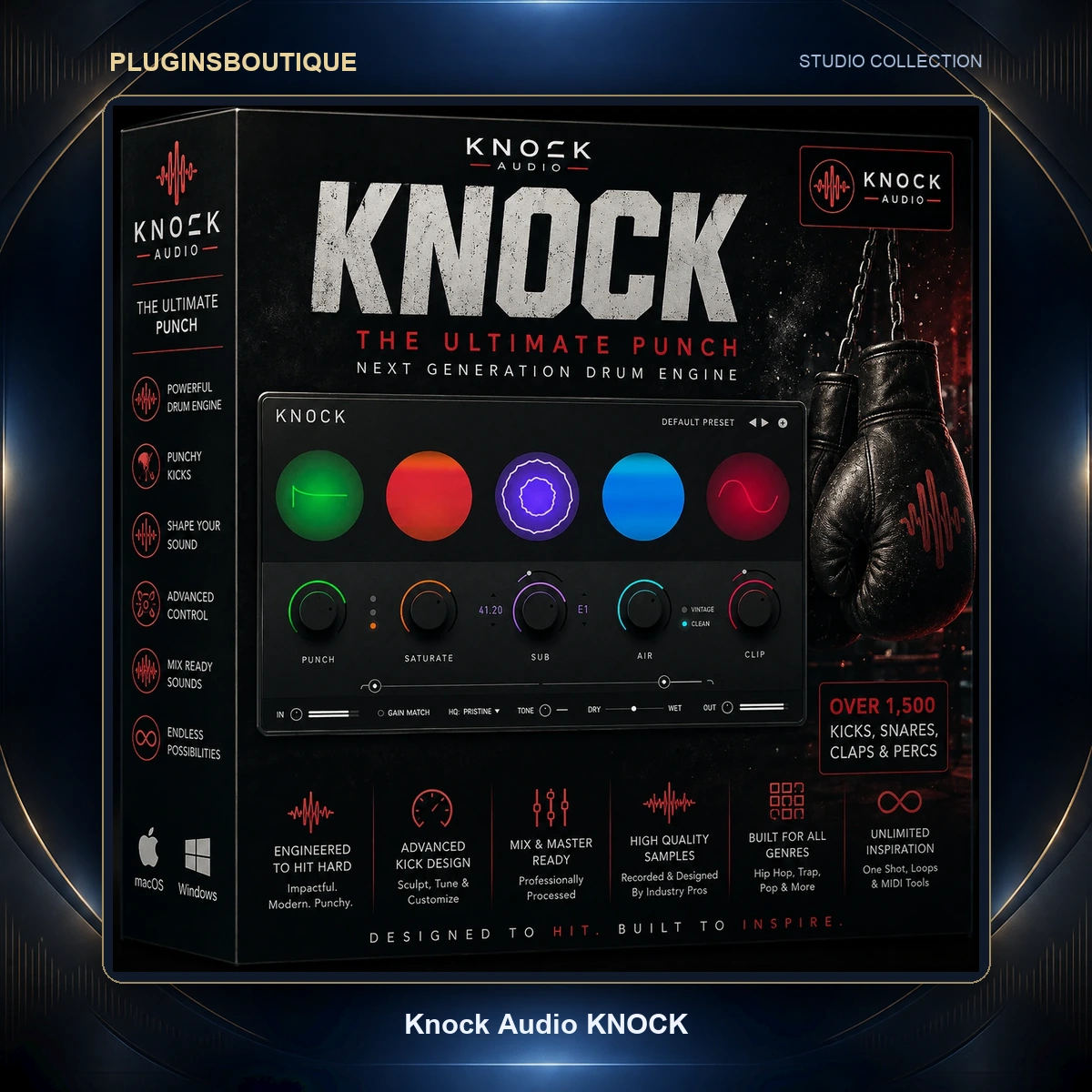
Knock Audio KNOCK is a drum enhancement and processing plugin designed to shape impact, harmonics, low end, brightness and loudness from a single interface.
Instead of combining multiple processors such as transient shapers, saturation plugins, sub enhancers, EQs and clippers, KNOCK brings five core processing stages together:
- Punch
- Saturate
- Sub
- Air
- Clip
The plugin was developed around the production approach of DECAP and his DRUMS THAT KNOCK sound design series.
Punch — Add More Attack
The Punch module acts as a transient shaper, emphasizing the attack portion of drums.
This can help:
- Kick drums cut through a mix
- Snares sound sharper
- Drum loops gain more impact
- One-shot drums become more aggressive
Use it when a drum sounds dull or lacks definition.
Saturate — Add Harmonic Character
The Saturate section adds harmonic distortion while compensating for perceived loudness.
Three modes are available:
- Soft
- Medium
- Hard
This section can be useful for adding density and character to drums, 808s, percussion and one-shot samples.
Sub — Add Low-End Weight
The Sub module detects kick drum activity and generates a layered sub-frequency tone.
You can control the pitch of the generated sub tone, making it useful for:
- Adding weight to kicks
- Reinforcing weak low end
- Creating deeper electronic drums
- Tuning kick reinforcement to the key of a track
This can be especially useful when working with sampled kicks that need more low-frequency presence.
Air — Add Smooth Top End
The Air section enhances high frequencies and is designed to add brightness without excessive harshness.
Two modes are available:
- Vintage
- Clean
Air can help bring additional presence to snares, hi-hats, percussion and full drum loops.
Clip — Add Loudness and Aggression
The Clip section provides adjustable hard and soft clipping.
Hard clipping can create a more aggressive sound, while soft clipping offers a rounder result. This makes it possible to push drum levels and add character without relying entirely on traditional compression.
Factory Presets by DECAP
KNOCK includes factory presets created by DECAP, giving users starting points for different drum-processing approaches.
Easy Workflow
One of the main ideas behind KNOCK is speed.
The interface brings multiple drum-processing techniques into a single plugin, allowing producers to experiment with transient shaping, saturation, sub enhancement, high-frequency processing and clipping without opening several separate plugins.
Knock Audio describes the plugin as lightweight enough to use across multiple tracks and designed for both beginners and experienced producers.
Key Features
- Five drum-processing modules in one plugin
- Punch transient shaping
- Harmonic saturation
- Soft, Medium and Hard saturation modes
- Kick-triggered sub-frequency generation
- Adjustable sub pitch
- Vintage and Clean Air modes
- Hard and Soft clipping
- Factory presets by DECAP
- Designed for kicks, snares, percussion and drum loops
- Compatible with major DAWs
- VST3, AU and AAX support
- Apple Silicon support
- Lightweight workflow
System Requirements
| Platform | Requirements |
|---|---|
| Developer | Knock Audio |
| Plugin Type | Drum Processing |
| Mac | macOS 11 or later |
| Windows | Windows 8.1, 10 or 11 |
| macOS Formats | AU, VST3, AAX |
| Windows Formats | VST3, AAX |
| Mac CPU | Intel Core i5/i7/i9/Xeon or Apple Silicon |
| Windows CPU | Intel Gen 5+ or AMD Quad Core |
| RAM | 8 GB minimum |
| Recommended RAM | 16 GB |
| Storage | Minimum 500 MB |
| VST2 | Not supported |
KNOCK is supported in DAWs that support the required VST3, AU, or AAX formats.
Product FAQ
What is Knock Audio KNOCK?
KNOCK is an all-in-one drum processing plugin combining Punch, Saturate, Sub, Air and Clip processing modules.
Who created KNOCK?
KNOCK was created by producer and sound designer DECAP and is inspired by the production approach behind the DRUMS THAT KNOCK series.
What does the Punch module do?
Punch acts as a transient shaper that enhances drum attack and impact.
Can KNOCK add sub bass to a kick?
Yes. The Sub module detects kick drum activity and generates a layered sub-frequency tone with adjustable pitch.
Does KNOCK include saturation?
Yes. The Saturate section offers Soft, Medium and Hard saturation modes.
Does KNOCK include presets?
Yes. Factory presets created by DECAP are included.
Is KNOCK compatible with FL Studio?
KNOCK supports VST3, so it can be used in compatible versions of FL Studio.
Does KNOCK support Logic Pro?
Yes. KNOCK supports the AU format required by compatible versions of Logic Pro.
Does KNOCK support Pro Tools?
Yes. AAX is supported for Pro Tools compatibility.









Reviews
Clear filtersThere are no reviews yet.