Try our service free
→ Discover complimentary downloads without needing a payment method.
Browse free





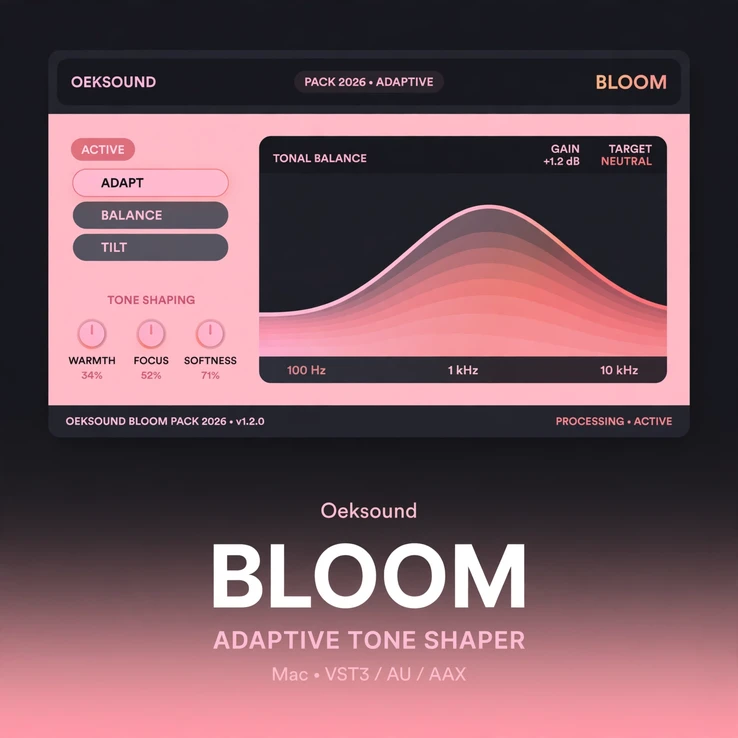


Start your oeksound bloom Mac download here — Oeksound’s adaptive tone shaper, released in March 2024 and the Finnish developer’s most complex processor to date.
Bloom analyses the character of your signal and applies corrections to the perceived tonal balance. The result is a more even, refined sound — without the guesswork of sweeping an EQ in search of problems.
Instead of fixing one frequency at a time, Bloom listens to the whole picture. It finds where the tone is uneven and smooths it out, so your tracks sit better in the mix with less effort.
What does oeksound bloom do?
Bloom is an adaptive tone shaper. It studies the tonal character of the audio passing through it, then makes intelligent, signal-dependent corrections.
Harsh spots are softened. Thin spots are filled out. The overall balance becomes more consistent from note to note and from section to section.
Because the processing adapts to the signal, it stays musical. Bloom does not flatten your sound or strip away its character — it refines it.
That makes Bloom different from a static EQ. A static EQ applies the same curve no matter what is playing. Bloom responds to what it hears, moment by moment.
oeksound bloom Mac download: how Bloom shapes your sound
Use Bloom wherever a track needs a more polished, even tone:
- Vocals: smooth out harshness and uneven resonances so vocals sit forward and clear.
- Instruments: give guitars, piano, keys and synths a more balanced, finished tone.
- Drums and buses: tighten the tonal balance of drum buses and instrument groups.
- Mix bus: add a final layer of polish and consistency across the whole mix.
- Mastering: refine the overall tonal balance before your final limiter.
With your oeksound bloom Mac download, you can move faster. Set Bloom up, listen, and let it do the detailed tonal work while you focus on the music.
Why producers choose Bloom
Mixing often comes down to tone. If the tone is uneven, every other decision gets harder. Bloom takes care of that foundation first.
It is especially useful on recordings that change a lot — a vocal that is warm in the verse and harsh in the chorus, or a guitar part that sounds different on every chord.
Bloom evens those changes out. The track becomes easier to place in the mix, easier to compress, and easier to finish.
How to use Bloom in your session
Getting started with Bloom is simple:
- Insert Bloom on the track, bus or mix bus you want to shape.
- Play the audio and listen to how Bloom responds to the tonal balance.
- Adjust the processing to taste, then move on to the rest of your mix.
Use it early in the chain to fix the tone, or later in the chain to polish a sound that is nearly there. Either way, Bloom works best when you trust your ears and let it adapt.
Compatibility — Mac system requirements
Your oeksound bloom Mac download runs on Intel and Apple Silicon Macs in all major DAWs:
- macOS 10.14 or later
- VST3, AU, and AAX plugin formats
- Intel Core i5 processor or Apple Silicon
- 8 GB RAM minimum
- iLok account required for authorisation
Frequently asked questions
Which plugin formats does Bloom support on Mac?
Bloom for Mac is available as VST3, AU, and AAX, so it runs in Logic Pro, Pro Tools, Ableton Live, Cubase, Studio One, and other major DAWs on Mac.
What Mac do I need to run Bloom?
Any Mac running macOS 10.14 or later, with an Intel Core i5 processor or Apple Silicon and at least 8 GB of RAM.
Do I need an iLok account?
Yes. Authorisation requires a free iLok account, as specified by Oeksound.
How is Bloom different from soothe?
Soothe targets resonances. Bloom shapes the overall tonal balance. Bloom looks at the character of the whole signal and corrects the perceived tone, while soothe focuses on taming specific resonant peaks.
Is this the Mac version only?
Yes. This listing is for the Mac edition of Oeksound Bloom. Windows is not available for this product.
Can beginners use Bloom?
Yes. Bloom is designed to listen and adapt, so you do not need deep EQ skills to get a better-sounding track. Experienced engineers will still appreciate how much time it saves.
What’s included with my purchase?
Your oeksound bloom Mac download includes a full license for Oeksound Bloom for Mac, delivered instantly after checkout.
Complete your oeksound bloom Mac download today and hear how much more even, balanced and refined your mixes can sound.










Reviews
Clear filtersThere are no reviews yet.