Try our service free
→ Discover complimentary downloads without needing a payment method.
Browse free






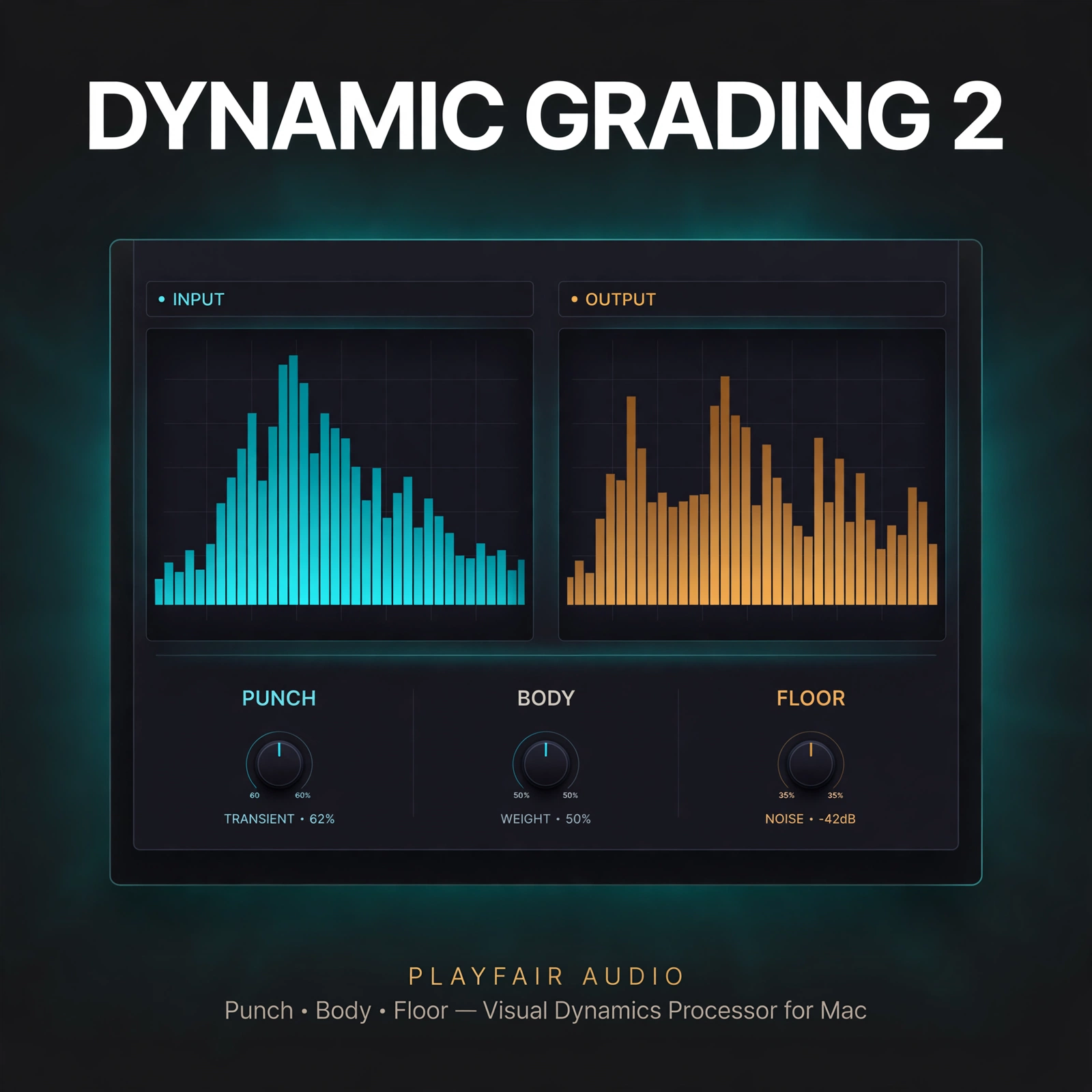


Most compressors ask you to set a threshold and hope. Playfair Audio Dynamic Grading 2 for Mac works the other way round: it shows you the dynamics first, then lets you shape them. At the heart of the plug-in sits a pair of dynamic histograms — live graphs of how often each loudness level occurs in the signal, one for the input and one for the output. You see the dynamic range, which loudness regions dominate, and how much the perceived loudness actually varies, before you touch a single control. That picture is what makes Dynamic Grading 2 a workhorse for mixing, mastering and post-production engineers, on every track, every day.
The processing model is built from first principles: what dynamics in audio really mean, how humans perceive them, and how to analyse and manipulate them in a musical way. Instead of one threshold and one ratio, Dynamic Grading 2 divides the signal into three regions and processes each one on its own. The result is control a conventional compressor cannot offer — tame the peaks without flattening the sustain, lift the room without pumping the vocal, or push a drum bus forward without touching its body.
Playfair Audio Dynamic Grading 2: punch, body and floor
Everything above the body range is the Punch range: note onsets, transients and attacks. Compressing the punch tames peaks and moves a track back in the mix while the overall loudness, which lives in the body, stays largely the same. Expanding the punch makes a track seem closer to the listener — a direct way to build a hierarchy in which some instruments stick out of the speakers while others lurk in the background.
The Body range is where most of a signal lives: the sustain of notes and chords, harmony, and medium-level percussion hits. Compressing the body reduces the difference between louder and softer notes, keeping every element audible in a busy mix — the classic compressor job, but applied only to the body, so the hard-to-control side effects on transients never appear. Expanding the body increases contrast, creates breathing room, and lets softer elements demand less attention.
Below the body sits the Floor range: low-level detail such as reverberation, echo and decay, plus unwanted elements like background noise. Expanding the floor pulls low-level detail back down, which dereverberates, reduces noise, and makes the notorious gated-reverb effect on drums remarkably easy. Compressing the floor exaggerates reverb and room instead, which can lead to striking pumping effects and artistic textures. Each region accepts compression or expansion independently, because every block offers inverse ratios.
The Hybrid Interface and Source Learn
Version 2 rebuilt the interface from the ground up. The Hybrid Interface combines graphical control handles with ratio and gain knobs, so the same adjustment can be made by dragging the target markers on the right-hand graph or by turning the knobs in the centre. Dragging the source markers on the left sets the three ranges; the two-threshold system defines exactly where body ends and punch and floor begin. Source Learn analyses a representative passage of the track and proposes sensible initial thresholds, so a useful starting point is one click away and can then be refined by ear.
The sidebar holds the fine-tuning tools. The Spectrum parameter applies noise-weighted sidechain filtering, guided by the Magic Eye display — a visual aid that makes spectrum adjustments unusually clear. Timing Refinement, with Response and Release controls, shapes the timing of the processing so precisely that pumping or shakiness can be eliminated rather than tolerated. The Amount control scales the whole effect without moving the handles or diluting it the way a wet/dry mix control would, and the Time Window, set in bars relative to the song tempo, controls how long the histograms analyse. The curve display shows exactly how the handle settings translate into a gain curve, and the resizable interface includes undo/redo, reference compare and preset management with a curated factory library.
Version 2.1: peak limiter, listen modes and four activations
The current version, 2.1, is a free update for all Dynamic Grading 2 owners and adds the two most requested features since version 2 shipped: a peak limiter at the output of the plug-in, so peaks stay under control when the punch is pushed hard or a drum bus is expanded aggressively, and listen modes that solo the punch on its own, or the punch and body together, so marker placement is faster and every threshold change can be heard in isolation before committing. Meters and histograms now move in sync with the audio even behind latency-heavy plug-ins, in AU and VST3. Multichannel surround up to 9.1.6 is supported, with a continuously variable channel link, which makes Dynamic Grading 2 a natural fit for immersive and cinematic projects as well as stereo mixes.
Licensing runs through a Playfair Audio account: each licence activates on up to four machines at once, with offline activation available and no dongle required. A fully functional 14-day trial is available from the official Playfair Audio page.
System requirements for Playfair Audio Dynamic Grading 2 on Mac
This listing covers Mac only; the Windows version is not included. On Mac, Dynamic Grading 2 runs as a 64-bit plug-in in AU, VST3 and AAX formats on macOS 10.15 or later, natively on both Apple Silicon and Intel processors. It needs a 2 GHz CPU and 4 GB of RAM, and works in any 64-bit AU, VST3 or AAX compatible host. Channels from mono up to 16 channels are supported. For anything not confirmed here, check the official Playfair Audio page before buying.
Frequently asked questions about Playfair Audio Dynamic Grading 2
Is this listing for Mac only? Yes. This listing covers Mac only; the Windows version is not included, although Playfair Audio also sells a Windows version separately.
How is Dynamic Grading 2 different from a normal compressor? A normal compressor works on the whole signal with one threshold. Dynamic Grading 2 splits the signal into punch, body and floor and compresses or expands each region independently, guided by live histograms of the input and output.
Can I expand as well as compress? Yes. Every region offers inverse ratios, so compression or expansion can be applied in any or all of the three regions.
Does it work on surround and immersive mixes? Yes — multichannel formats up to 9.1.6 are supported, with a continuously variable channel link.
How many machines can I activate? Each licence activates on up to four machines through a Playfair Audio account, with offline activation available and no dongle required.
Playfair Audio Dynamic Grading 2 for Mac, €39.99 instead of €99: see the dynamics, then shape them — punch, body and floor, each under its own control.







Reviews
Clear filtersThere are no reviews yet.