Build the Drum Sounds You Actually Want
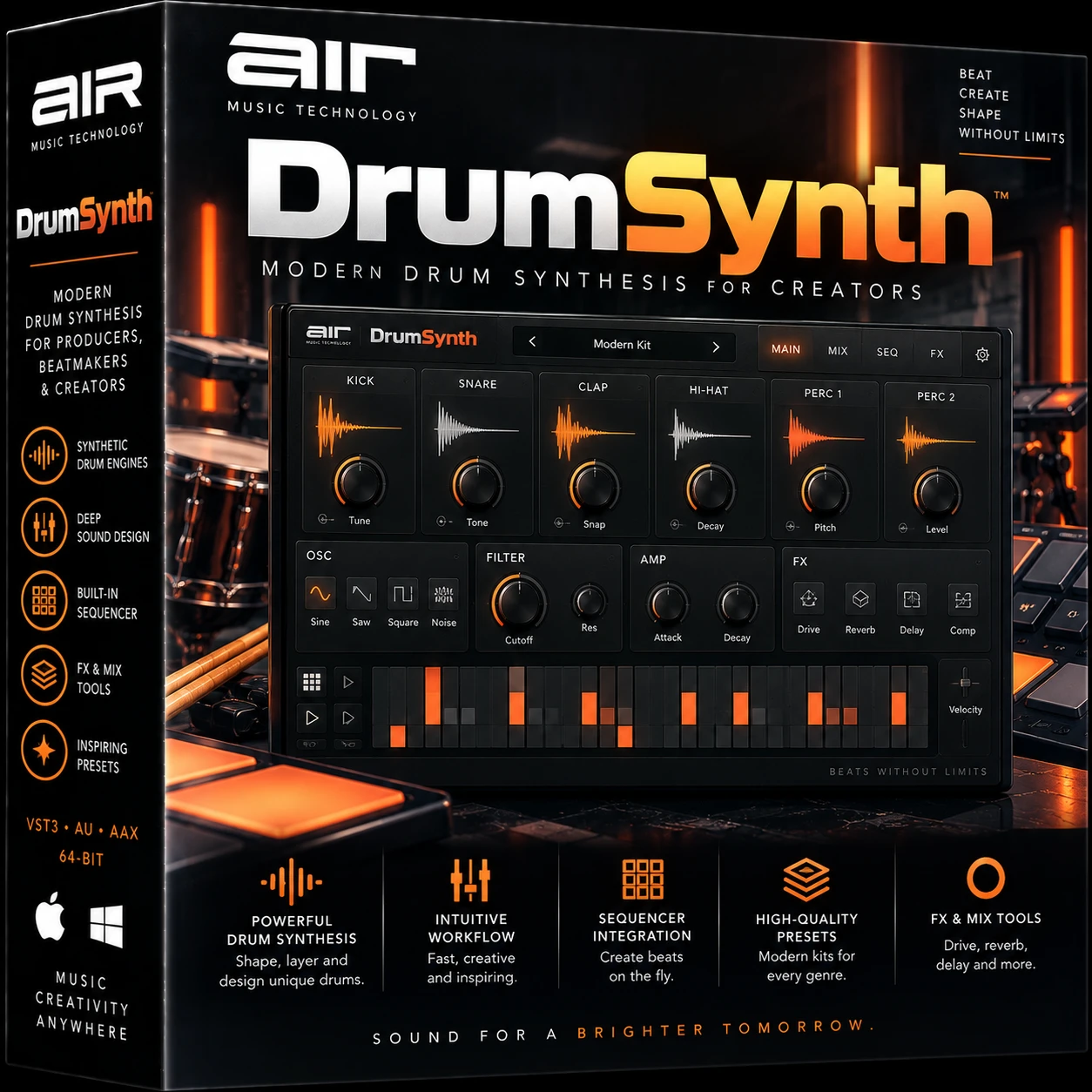
AIR Music Technology DrumSynth is designed for producers who want more control over their drums than a conventional collection of samples can provide.
Instead of simply loading a kick or snare recording and processing it, DrumSynth gives you dedicated synthesis engines for creating and sculpting your own percussion.
Its architecture combines several sound-generation techniques, including FM synthesis, analog modeling and physical modeling, providing a flexible foundation for everything from classic electronic drums to modern experimental percussion.
Whether you need a deep electronic kick, sharp snare, metallic hi-hat, synthetic clap or unusual percussive texture, DrumSynth provides dedicated tools for building the sound around your production.
Eight Dedicated Drum Engines
At the heart of DrumSynth are eight individual sound engines:
- Kick
- Snare
- Clap
- Hi-Hat
- Tom
- Percussion
- Crash
- Ride
Each engine is designed around the characteristics of its respective percussion type.
Instead of forcing one generic synthesizer architecture to create every drum, AIR provides specialized engines that make it easier to reach useful percussion sounds quickly.
This approach combines the speed of a drum machine with the flexibility of synthesis.
Kick Engine
The Kick engine gives producers a dedicated starting point for synthesized bass drums.
It can be used for:
- Deep electronic kicks
- Punchy house kicks
- Techno kicks
- Short hip-hop kicks
- Synthetic 808-style percussion
- Aggressive electronic bass drums
- Experimental low-frequency percussion
Because the sound is synthesized, you can shape it around your track rather than spending time searching through hundreds of kick samples.
Snare Engine
The dedicated Snare engine provides the building blocks for synthesized snare sounds.
Create everything from tight electronic snares to more aggressive, noisy and futuristic percussion.
Once the core snare has been created, DrumSynth’s processing section can add transient impact, EQ shaping, compression and ambience.
Clap Engine
The Clap engine is dedicated to synthetic handclap-style sounds.
It can be used for classic electronic claps, wide modern claps and layered percussion textures.
Processing with reverb and delay can then push the clap into larger spatial or experimental territory.
Hi-Hat Engine
Hi-hats are an essential part of electronic drum programming.
DrumSynth’s dedicated Hi-Hat engine gives producers control over synthesized high-frequency percussion instead of restricting them to static samples.
Use it for:
- Closed hats
- Open-style electronic hats
- Metallic percussion
- Bright rhythmic layers
- Experimental high-frequency textures
Tom and Percussion Engines
The Tom and Percussion engines broaden DrumSynth beyond basic kick, snare and hat programming.
The Tom engine can produce pitched electronic drum sounds, while the Percussion engine provides a more flexible platform for unusual rhythmic elements.
These engines are particularly useful for techno, house, cinematic percussion and experimental electronic music.
Crash and Ride Engines
DrumSynth also includes dedicated Crash and Ride engines.
This gives the instrument a more complete drum-machine architecture and allows cymbal-style sounds to be synthesized and customized alongside the rest of the kit.
Multiple Synthesis Technologies
One of DrumSynth’s biggest strengths is its multi-synthesis architecture.
Rather than depending on a single synthesis technique, AIR combines:
FM Synthesis
Frequency modulation can generate complex harmonics and metallic textures, making it especially useful for digital percussion, cymbals and experimental sounds.
Analog Modeling
Analog-style synthesis provides familiar electronic drum-machine character and is particularly useful when building classic kicks, snares and toms.
Physical Modeling
Physical-modeling algorithms can simulate some of the behavior and response associated with physical percussion instruments while remaining highly editable.
Together, these technologies give DrumSynth a broader sonic range than a basic sample-based drum machine.
52 Preset Kits
You don’t have to build every sound from zero.
DrumSynth includes 52 preset kits, covering classic-inspired drum-machine territory as well as more contemporary creations.
These presets can be used immediately or treated as starting points for your own sounds.
Load a kit, adjust the synthesis parameters, process individual drum elements and save the finished result into your own preset collection.
Dedicated Drum Mixer
Once your drum sounds have been created, they still need to work together as a kit.
DrumSynth includes a dedicated mixer with independent controls, making it possible to balance the individual elements inside the instrument.
This keeps much of the drum-production workflow inside a single plugin.
Transient Shaper
Transient processing is particularly valuable for drums because the initial attack strongly influences how punchy or soft a drum feels.
DrumSynth includes a dedicated Transient Shaper among its processing options.
Use it to emphasize attack when a kick or snare needs more impact, or shape the transient differently when a sound feels too aggressive.
EQ
Built-in EQ provides additional tonal control.
After creating the fundamental drum sound, EQ can help remove unnecessary frequencies, emphasize important tonal areas and make each element fit more naturally with the rest of the kit.
Compression
DrumSynth also includes compression processing.
Compression can be used to control dynamics, increase density or help synthesized drums feel more cohesive.
Combined with the transient shaper, it provides useful control over both the attack and overall dynamics of a drum.
Reverb
Built-in reverb makes it possible to add space directly inside DrumSynth.
This is particularly useful for:
- Large snares
- Ambient percussion
- Cinematic drums
- Electronic claps
- Experimental cymbals
- Spacious percussion textures
The user guide documents several reverb modes, including Hall, Stadium, Room and Abstract.
Delay
Delay provides another creative processing option.
It can turn simple percussion into rhythmic patterns and add additional movement without requiring another plugin.
This can be especially effective on claps, percussion, hats and experimental synthesized sounds.
Save Your Own Drum Sounds
An important part of the DrumSynth workflow is the ability to save custom creations.
After designing and processing a drum sound, you can store it in the onboard user preset slots.
Over time, this lets you build a personalized library of drum sounds instead of repeatedly searching through large sample folders.
Classic One-Shot Workflow
DrumSynth includes a classic One-Shot feature.
This complements the instrument’s drum-machine workflow and makes it easier to trigger synthesized percussion as individual hits from your DAW, keyboard, pads or MIDI programming.
Great for Electronic Music
DrumSynth is particularly well suited to electronic production.
It can be used across:
- Techno
- House
- EDM
- Hip-hop
- Trap
- Drum & bass
- Synthwave
- Pop
- Experimental electronic music
- Cinematic music
- Sound design
Because the sounds are synthesized and editable, one instrument can produce dramatically different drum palettes for different genres.
Create Your Own Signature Drum Library
Sample packs are convenient, but popular samples can appear in thousands of other productions.
Drum synthesis gives you another option.
Start with the dedicated engines, modify the synthesis parameters, apply effects and save the result.
You can gradually create a personal collection of kicks, snares, hats, percussion and cymbals that fits your production style.
Mac & Windows Compatibility
The current AIR Music Technology specifications list support for both Windows and macOS.
Windows
- Windows 10
- Windows 11
- Dual-core 2.5 GHz CPU
- 4 GB RAM
- 8 GB RAM recommended
- 200 MB free disk space
- VST2/VST3 compatible host
- AAX-compatible host
macOS
- macOS 12 through macOS 15 according to the current official requirements
- Dual-core 2.5 GHz CPU
- 4 GB RAM
- 8 GB RAM recommended
- 392 MB free disk space
- VST2/VST3 compatible host
- AAX-compatible host
- AU-compatible host
Technical Specifications
| Specification |
Details |
| Product |
AIR Music Technology DrumSynth |
| Type |
Drum Synthesizer / Drum Machine |
| Drum Engines |
8 |
| Kick |
Yes |
| Snare |
Yes |
| Clap |
Yes |
| Hi-Hat |
Yes |
| Tom |
Yes |
| Percussion |
Yes |
| Crash |
Yes |
| Ride |
Yes |
| Preset Kits |
52 |
| FM Synthesis |
Yes |
| Analog Modeling |
Yes |
| Physical Modeling |
Yes |
| Transient Shaper |
Yes |
| EQ |
Yes |
| Compression |
Yes |
| Reverb |
Yes |
| Delay |
Yes |
| Dedicated Mixer |
Yes |
| User Presets |
Yes |
| Windows |
Windows 10/11 |
| macOS |
macOS 12–15 |
| VST2 |
Yes |
| VST3 |
Yes |
| AU |
macOS |
| AAX |
Yes |
DrumSynth vs DrumSynth 500
It is important not to confuse AIR DrumSynth with AIR DrumSynth 500.
They are separate AIR Music Technology products.
DrumSynth focuses on its eight synthesized drum engines and modern sound-design workflow, whereas DrumSynth 500 is an older electronic drum instrument with its own library and architecture.
If you’re creating a WooCommerce listing, use AIR Music Technology DrumSynth consistently in the title, description and SEO metadata so customers can identify the correct product.
Who Is AIR DrumSynth For?
DrumSynth is an excellent tool for:
- Electronic music producers
- Beatmakers
- Hip-hop producers
- Techno producers
- House producers
- EDM producers
- Drum programmers
- Sound designers
- Film/game composers
- Producers who prefer synthesis over sample hunting
Frequently Asked Questions
What is AIR Music Technology DrumSynth?
DrumSynth is a virtual drum-machine and drum-synthesis plugin that uses multiple synthesis technologies to create customizable electronic percussion.
How many drum engines does DrumSynth include?
DrumSynth contains eight dedicated engines: Kick, Snare, Clap, Hi-Hat, Tom, Percussion, Crash and Ride.
How many preset kits are included?
DrumSynth includes 52 preset kits.
Does DrumSynth use FM synthesis?
Yes. Its multi-synth architecture incorporates FM synthesis alongside analog modeling and physical modeling.
Can I create my own drum presets?
Yes. Custom sounds can be stored in the onboard user preset slots.
Does DrumSynth have built-in effects?
Yes. Its processing collection includes transient shaping, tuning, EQ, compression, reverb and delay.
Does AIR DrumSynth work on Windows 11?
Yes. Windows 10 and Windows 11 are listed in the current official requirements.
Does DrumSynth work on Mac?
Yes. The current official specifications list macOS 12 through macOS 15.
Does DrumSynth support VST3?
Yes. VST3 is supported.
Does DrumSynth support Audio Units?
Yes. AU is available on macOS.
Does DrumSynth support AAX?
Yes. AIR lists AAX-compatible hosts for both Windows and macOS.
Conclusion
AIR Music Technology DrumSynth combines the immediate workflow of a drum machine with the flexibility of a dedicated percussion synthesizer.
Its eight specialized engines, multiple synthesis technologies, 52 preset kits, independent mixer and built-in transient, EQ, compression, delay and reverb processing provide a complete environment for creating electronic drums.
Instead of searching endlessly for the right sample, DrumSynth lets you build the sound yourself—and save your favorite creations as a personalized drum collection.
















 Download instantly from PluginsBoutique
 Instant Digital Delivery




Reviews
Clear filtersThere are no reviews yet.